Client Icons: Versatile Minimalist Icon Sets for Every Project
Finding the right visual elements for a project often takes longer than expected. You might spend hours browsing free icon libraries only to discover inconsistent styles, limited formats, or licenses that restrict commercial use. Client Icons solves this problem by offering a carefully crafted set of high-quality icons that work across websites, mobile apps, printed materials, and digital media without the usual headaches.
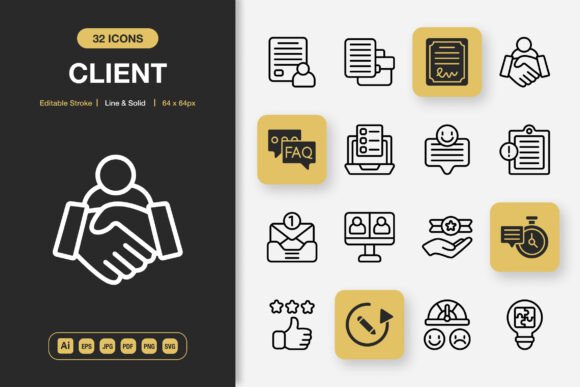
What makes this collection stand out is its thoughtful balance between simplicity and flexibility. Every icon in the set arrives in both line and solid styles, giving you immediate options for different design contexts. Rather than forcing you to adapt your project to the icons, these icons adapt to whatever you're building.
What Actually Comes in the Client Icons Package
When you download Client Icons, you're not getting a handful of graphics wrapped in a single file type. The package includes source files, multiple vector formats, and raster exports at several sizes. This means you can open the original Adobe Illustrator file and make deep customizations, or you can grab a ready-to-use PNG with transparency and drop it straight into your layout.
Here is a quick look at the included file types and what they're best suited for:
- Adobe Illustrator (.AI) — The master source file for full editing control over every anchor point and stroke
- EPS Version 10 — A widely compatible vector format that works with older software and print workflows
- SVG — Lightweight, scalable code-based graphics ideal for web development and responsive design
- PDF — A reliable format for sharing proofs, embedding in documents, or sending to print vendors
- JPG — A flattened raster option for quick placements where transparency isn't needed
- PNG with transparency — Available at 32px, 48px, 64px, 96px, 128px, 256px, and 512px, ready for screens and digital layouts
- Readme.txt — A straightforward guide that explains licensing, usage tips, and file organization
Having all these formats from the start removes the friction of converting files or hunting down missing sizes. You spend less time on file management and more time on actual design work.
Why Designers and Non-Designers Keep Coming Back to This Set
One of the most practical aspects of Client Icons is the editable stroke feature. In many icon packs, the stroke weight is baked in and cannot be adjusted without distorting the shape. Here, you can open the vector files and tweak the stroke thickness to match your brand guidelines or layout requirements. A thinner stroke might suit a delicate website header, while a bolder line could anchor a poster design with more visual weight.
The collection also includes both line and solid style variants. Line icons bring an airy and modern feel — they work beautifully on light backgrounds, in user interfaces, and in minimalist brand systems. Solid icons offer stronger presence and better readability at very small sizes, making them ideal for mobile app navigation, buttons, and infographic callouts. Having both styles in one package means you maintain visual consistency without switching between unrelated icon families.
100% customizability goes beyond stroke edits. You can recolor any icon, combine elements from multiple icons, adjust corner rounding, or simplify details for smaller display contexts. Because the source file is included, nothing is locked or flattened. For teams that need to match strict brand palettes, this level of control is essential.
Where Minimalist Icon Design Makes a Real Difference
Minimalist icon design isn't simply a trend — it solves real communication challenges. Icons that are clean, uncluttered, and instantly recognizable help users navigate interfaces faster. They reduce cognitive load in apps and websites. In printed materials, they guide the eye and break up text without overwhelming the page. Client Icons embraces this philosophy with shapes that stay clear at both tiny favicon dimensions and large poster scales.
Consider these common scenarios where a dependable icon set changes the outcome:
Websites and Landing Pages
Feature sections, service lists, and navigation menus all benefit from small visual anchors. With Client Icons, you can place consistent line icons next to each service heading and use solid versions for call-to-action buttons. The SVG format keeps page load times low, and the transparent PNG sizes cover retina displays without blurry edges.
Mobile App Interfaces
Bottom navigation bars, tab icons, and settings menus demand clarity at around 24px to 32px. The included PNG sizes at 32px and 48px give you pixel-perfect assets right away. If you need a custom size, the vector files let you export at any resolution without quality loss.
Books, eBooks, and Educational Materials
Authors, educators, and instructional designers often need simple diagrams and symbolic illustrations. Line-style icons from this set can mark chapters, highlight tips, or represent abstract concepts without distracting from the reading experience. The PDF and JPG formats make insertion into word processors and layout software effortless.
Social Media Graphics and Infographics
Icons add professionalism to social posts, carousel slides, and data visualizations. Instead of downloading random graphics from different places and hoping the styles match, you can pull from a single cohesive collection. Solid icons work particularly well for statistic callouts and infographic nodes, while line icons add subtle decoration to quote cards and announcement banners.
Flyers, Banners, Posters, and Print Collateral
Printed materials require high-resolution assets. The 256px and 512px PNG files, along with the vector formats, ensure your icons look crisp whether printed on A6 flyers or large-format banners. Small businesses creating in-house promotional materials will appreciate not needing to outsource simple graphic elements.
How the Easy Drag-and-Drop Workflow Saves Time
One underrated advantage of Client Icons is how quickly you can move from file to finished layout. The PNG files come with transparency already applied, so dragging an icon onto a colored background in Photoshop, Canva, Figma, or even PowerPoint requires no extra steps. There's no white box to remove, no path to isolate. For people who aren't professional designers but still need polished results — bloggers, marketers, small business owners — this convenience matters enormously.
The folder structure tends to be organized by size and format, which means you can locate the 64px solid version or the line SVG without scanning through dozens of unlabeled files. Small organizational touches like this reduce the friction that often makes asset management feel tedious.
What to Consider Before Choosing an Icon Set
No single icon collection fits every possible need, and being honest about your requirements upfront prevents frustration later. Here are a few points worth thinking about when evaluating Client Icons for your situation:
- Style consistency across your brand: If your existing materials use a highly detailed or hand-drawn icon style, a minimalist set might need some complementary adjustments to your overall visual language. However, if you're starting fresh or updating an outdated look, the clean lines and solid shapes provide a strong foundation.
- Number of icons in the set: Check that the collection covers the categories and concepts you actually need. A focused set of well-executed icons often serves a project better than a massive library where half the entries feel irrelevant.
- Software compatibility: The Adobe Illustrator file requires access to that program or a compatible vector editor. If your workflow relies entirely on free browser-based tools, the SVG, PNG, and PDF formats will still serve you well, but deep stroke edits may need a vector-capable application.
- Licensing terms: Always read the included Readme.txt to understand whether the license covers client projects, commercial products, or unlimited users within your organization.
- Color customization: While vector formats allow unlimited recoloring, the raster PNG files are delivered in a default color. If you need a specific brand color in raster form, you'll need to adjust the vectors and export your own PNGs.
Who Benefits Most from a Set Like This
The versatility built into Client Icons makes it relevant across a surprisingly broad range of users. Freelance designers can keep it as a go-to resource for client projects that demand quick turnaround and professional polish. In-house marketing teams benefit from having a consistent icon style across presentations, landing pages, and social campaigns. Entrepreneurs building their first website or mobile app get professional-looking interface elements without hiring a custom illustrator.
Bloggers and content creators often find that thoughtfully placed icons increase reader engagement by breaking up long text sections and visually reinforcing key points. Educators creating worksheets, slide decks, and online course materials use icons to signal different activity types — discussion prompts, reading sections, or reflection questions — helping learners navigate content more intuitively.
Small print shop owners and local businesses designing their own flyers and posters can elevate their materials from amateur to polished with just a few well-chosen icons. Because the PNG files come in multiple sizes and with transparency, placing them onto busy backgrounds or colored paper templates remains clean and professional.
The combination of line and solid style variants essentially doubles the creative range without doubling the cost or effort. You can use line icons for headers and solid icons for bullet points, or switch between the two based on background contrast. This dual-style approach is practical for building visual hierarchy without introducing unrelated graphic elements.
Practical Observations from Real-World Use
People who work with icon sets regularly know that quality varies dramatically. Some packs look beautiful at 200% zoom but fall apart at 24px. Others export with messy anchor points that cause printing issues. The emphasis on high quality and editable stroke in this collection suggests attention to the technical details that separate professional assets from amateur ones.
The inclusion of an EPS Version 10 file is also worth noting. Even though newer formats exist, many print production environments and legacy workflows still prefer EPS for its reliability. Having this backwards-compatible format means fewer conversations with print vendors about missing fonts or incompatible versions.
For those new to working with vector graphics, the multiple raster sizes provide a gentle on-ramp. You can start by using the pre-exported PNG files and gradually learn how to customize vectors as your skills grow. The collection supports both immediate practical use and longer-term creative growth.
A Few Final Thoughts on Upgrading Your Visual Toolkit
Small details in design often carry outsized impact. An inconsistent icon set can make an otherwise strong layout feel disjointed and unprofessional. A well-matched set quietly reinforces your message and helps your audience focus on what matters. Client Icons offers that quiet reinforcement across a wide range of formats and use cases without locking you into a rigid style or complicated workflow.
The easy drag-and-drop functionality, combined with serious customization depth through the vector source files, means you can move fast when you need to and refine deeply when the project demands it. Whether you're updating a website, launching an app, creating a flyer, or building a social media campaign, having a reliable, high-quality icon set within reach changes the pace and quality of your work.
Take a moment to think about your next project and where visual clarity could make a difference. Chances are, a set of clean, editable, and well-organized icons will help you get there with fewer detours and better results.