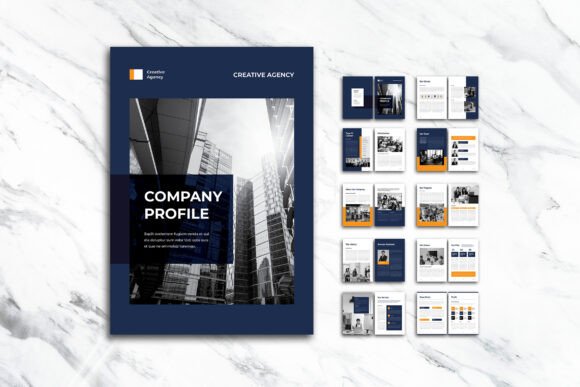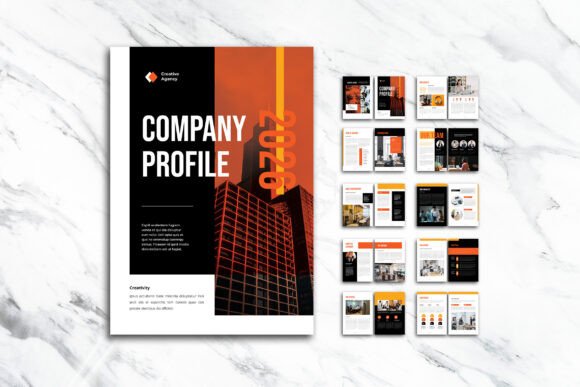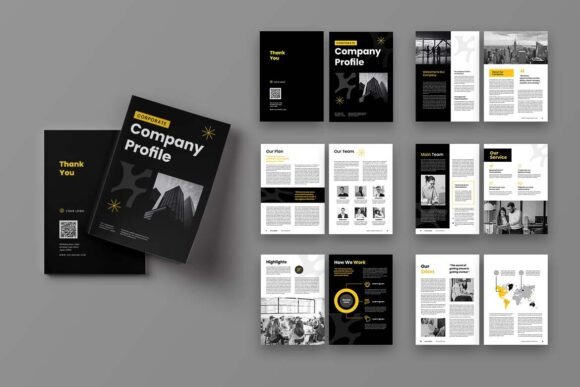
Dark Theme Company Profile: A Stylish A4 InDesign Template
A polished company profile does more than share facts — it shapes how people see your brand. The Dark Theme Company Profile InDesign template offers a professional A4 layout built for exactly that. Whether you're a freelancer creating a lookbook, a small business owner preparing a capabilities statement, or a marketer designing an investor presentation, this 12-page template helps you combine images, infographics, and text in a clean, modern way. Its dark backdrop adds sophistication and lets your content stand out, while the fully editable INDD and IDML files give you control without forcing you to start from scratch.
Because the template includes both the native InDesign file and a PDF document, it can serve multiple needs at once — a printed leave‑behind, a digital portfolio, or a proposal deck. The design works across sectors because it doesn’t prescribe a single industry style. Instead, it gives you a flexible structure that you can quickly adapt. The dark theme is not just an aesthetic choice; it also reduces visual clutter, directs attention to infographics and photography, and can complement brands that already use deep color palettes for their identity.
Who Really Benefits from a Dark Theme Layout?
Different people evaluate document templates through different lenses. An entrepreneur might prioritize speed and first impressions. A marketing manager might look for brand consistency and the ability to repurpose content across campaigns. A freelance designer could value the smart layer structure that saves hours of production time. An educator or student might need a crisp template that teaches grid-based composition while still looking highly professional. Understanding these perspectives helps you see whether the Dark Theme Company Profile matches your own priorities.
For beginners, the template reduces the fear of the blank page. With well-organized layers and easy-to-replace placeholder content, a new InDesign user can produce a credible document quickly. The included free fonts (sourced from DaFont or Google Fonts) also remove the obstacle of hunting down typefaces. A beginner might use the template to create a first-ever client proposal or an event sponsor deck, learning layout principles along the way.
For experienced users, the value shifts toward efficiency and refinement. An editor or senior designer can take the template and tweak typography details, swap color accents without breaking the dark base, or integrate custom charts directly into the smart layer system. Because the file is set up in CMYK with 300 DPI and 3 mm bleed, print-ready output is immediate. No time is wasted on pre-press adjustments. Experienced users often evaluate a template by how little they need to fix — and here, the clean organization of layers and the consistent master pages reduce rework significantly.
Creative Professionals and the Power of Visual Storytelling
Photographers, illustrators, and visual artists often need to present work in a way that feels immersive. A dark background naturally frames images, giving them a gallery-like presence that can be hard to achieve with white or light templates. The Dark Theme Company Profile integrates infographics and image placeholders in a layout that doesn’t compete with the art. A photographer might use the template to build a mini portfolio highlighting a recent project — mixing full-bleed shots with caption pages and simple stats about the shoot. By using the smart layers, they can drop in their own images and watch the dark theme amplify contrast and color.
For content creators and bloggers who want to offer media kits or brand collaborations documents, the template can bridge the gap between casual digital content and more formal business outreach. It says, “I take my work seriously,” without requiring a degree in graphic design. The balance between infographic sections and text pages lets creators showcase audience metrics, partnership highlights, and past campaign results all in one cohesive narrative.
Business Owners and the Need for Quick Professional Materials
Small business owners often wear many hats. They don’t have time to learn advanced layout techniques, yet they understand that a homemade-looking document can undermine credibility. The Dark Theme Company Profile helps them produce a leave-behind that feels custom-designed. A boutique hotel, for example, might turn the template into a corporate brochure describing its sustainability efforts, room categories, and guest experience — using large hero images on the cover and infographics for awards or occupancy data. Since the template works with free fonts, there is no extra licensing cost to worry about.
A startup founder preparing for a pitch event might adjust the template into an investor introduction. They can replace placeholder images with product shots and transform text sections into problem-solution statements. The dark theme lends an air of confidence and seriousness, while the consistently sized A4 pages make the document easy to print or email. The fact that the files are organized into clear layers means last-minute copy changes don’t turn into a formatting disaster.
Marketers, Agencies, and the Value of Reusable Assets
Marketing teams often need a library of adaptable templates that maintain brand consistency without starting every document from zero. The Dark Theme Company Profile can become the foundation for client proposals, case studies, or service brochures. Because it includes both INDD (native) and IDML (compatible with older InDesign versions) formats, team members using different software versions can still collaborate. The 12-page structure is substantial enough to cover multiple sections — executive summary, services, team, case studies, metrics — yet compact enough to hold a reader’s attention.
One overlooked advantage for marketers is the way the dark background reduces the visual impact of mixed-quality images. In a light template, low-contrast photos or slightly off-brand graphics can stand out negatively. A dark theme tends to absorb minor imperfections and unify the overall aesthetic. This can be a relief when gathering image assets from different departments or client sources.
Educators and Students: Learning Through a Real-World Template
An instructor teaching InDesign or corporate communication can use the template as a teaching tool. The neatly organized layers demonstrate file hygiene. The use of master pages shows efficient document setup. Students can deconstruct the template to understand grid-based design, typographic hierarchy, and color management — all while producing a professional-looking assignment that strengthens their portfolio. Because the fonts are free, there are no access barriers for students working from home.
On the other hand, a student entering a competition or submitting a capstone project might appreciate that the template feels advanced yet remains approachable. The included PDF can also serve as a quick reference for what the final design should look like, helping them spot discrepancies between their screen and intended output. The 3 mm bleed and CMYK settings introduce print production concepts in a practical, hands-on way.
Flexibility That Supports Multiple Goals
One template rarely satisfies everyone, but the Dark Theme Company Profile was built with enough flexibility to adapt. You can think of it as a skeleton that you dress differently based on the occasion. If you prioritize speed, you can simply replace placeholder copy and images, then export. If you care about creativity, you can adjust the number of pages, move infographic modules, or change accent colors — all while preserving the dark structure. If print reliability is your main concern, the provided CMYK format and bleed settings give you confidence that what you see on screen translates accurately to paper.
Different users also value different levels of support. The inclusion of a PDF version means even someone without InDesign can view the layout and provide feedback before the final export. This can be crucial when clients or team members need to approve designs but don’t own the software. The PDF also acts as a backup, preserving the original design intent in case someone makes unintended changes to the working file.
Key Features That Make the Difference
Several technical details of the Dark Theme Company Profile directly relate to real workflow needs. The 12 custom pages include a front cover and a back cover, giving you a complete document that feels book-like and substantial. The A4 size (29.7 cm x 21 cm) is standard for corporate documents across many countries, meaning you can find matching envelopes, sleeves, or binding options easily. The 300 DPI resolution ensures sharp output for both digital viewing and professional printing.
The smart layer system is more than a convenience — it changes how you work. When you open the file, you see logical groupings (background, images, text, graphics) that let you edit or hide elements without hunting through disorganized panels. This is particularly useful if you want to swap out the color of graphic accents globally or temporarily hide images to focus on copy editing. The free fonts are a deliberate inclusion that keeps the template accessible immediately after download. You won’t need to search for expensive typefaces just to see the intended look.
It’s also important to note that while the preview images demonstrate the template’s potential, those photographs are not included in the download. This encourages you to use your own visual assets, making the final result unique rather than a clone of the preview. For many users, this is a positive point because it avoids generic stock photography that could appear in multiple businesses’ materials.
Making the Most of Customization Without Overcomplicating Things
Beginners often worry that a dark theme might demand specialized knowledge. In practice, working with this template follows the same principles as any well-built InDesign file. You can change the text instantly using familiar type tools. Images can be placed into the dedicated frames with a simple drag-and-drop or file menu command. The dark background is consistent across pages, so you don’t need to manually apply it each time. If you decide you want a lighter accent color for headings or infographic elements, you can modify a few swatches and see the change propagate.
Experienced users might push customization further. They could convert some text frames to interactive elements for a digital PDF with hyperlinks. They could add their own paragraph styles, duplicate master pages to create new section layouts, or adjust the number of columns within specific text boxes. The provided IDML format ensures that even users with older InDesign versions can open the file without compatibility errors — a small but significant detail when collaborating across different software setups.
Because the template is built for A4, you need to consider whether your final audience expects that paper size. In some regions, US Letter is more common. While you can resize the document in InDesign, doing so might require adjustment. The template works best when your primary use case matches A4. For digital-only usage, the paper size matters less, and the proportions remain comfortable for on-screen reading.
Is This Template Right for Your Next Project?
Choosing a template often comes down to alignment: does it match your skill level, your deadline, and the impression you want to leave? If you need a professional, image-rich company profile that feels modern and requires minimal setup, the Dark Theme Company Profile is a solid candidate. It tends to work well for projects that involve photography, bold typography, and data visualization. If your brand uses mostly light, airy visuals, or if you need an extremely text-heavy document with little imagery, the dark theme might not serve your content as naturally. However, even text-forward documents can look elegant on a dark background when images are limited to section dividers and the cover.
Consider your end goal. A freelancer presenting a service brochure to a local client will have different needs than a corporate communications manager preparing a quarterly report. The template’s structure is adaptable enough for both, but the former might value the visual impact more, while the latter might appreciate the organized layer architecture that makes content updates quick and safe. Think about how often you’ll need to revise the document. If it’s a living file updated every quarter, the smart layers and clean organization will pay off each time you open it.
Ultimately, the Dark Theme Company Profile is not just a set of predesigned pages. It’s a time-saving framework that helps you produce a high-quality document without the usual friction. The combination of print-ready specs, free fonts, and an intuitive layout makes it approachable for first-time InDesign users and efficient for seasoned professionals. Whether you’re telling your company’s story, pitching a new idea, or presenting your creative portfolio, the dark theme provides an elegant stage for your content to shine.